Backups that set themselves up and prove they work
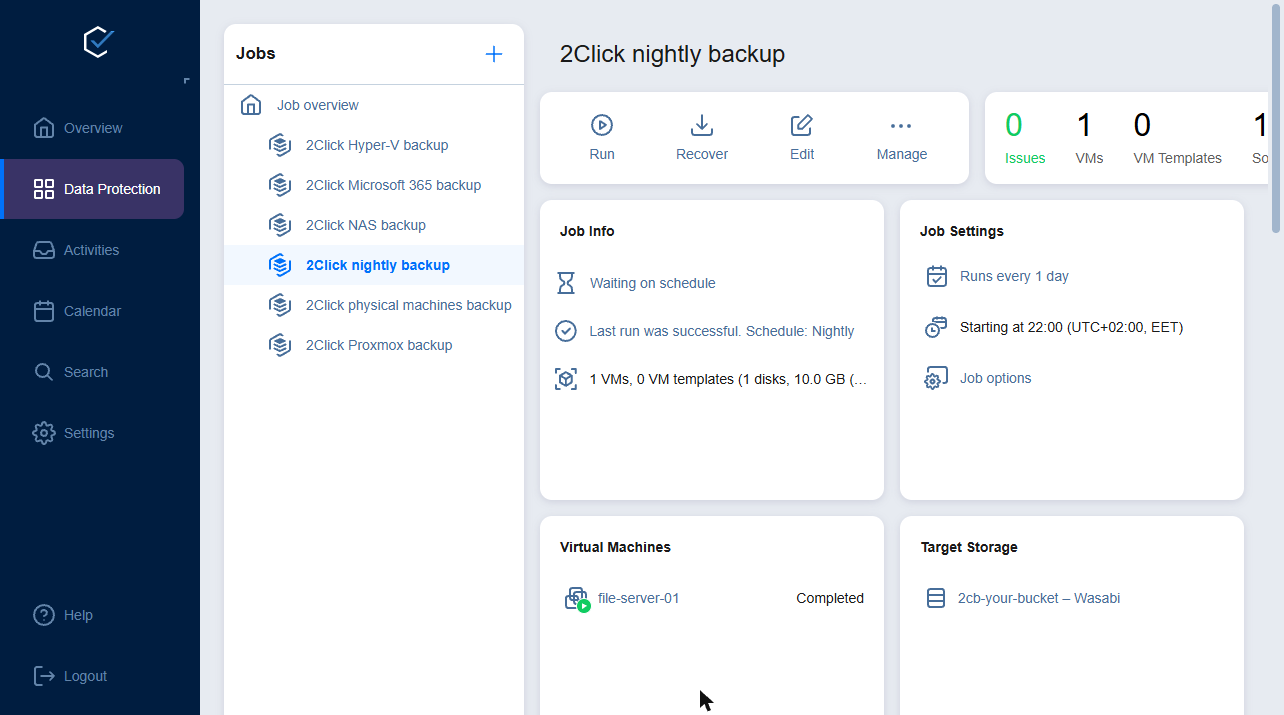
Install one small service in your network. We create the nightly backup jobs for VMware, Hyper-V, Proxmox, physical servers, NAS shares and Microsoft 365. Every job is immutable and encrypted and stored in your own bucket in the EU, and VMware and Hyper-V VMs are test-restored after every run. From €45/month.
No setup fees · Cancel any time · Backups stored in the EU (Frankfurt)
From order to first backup without designing a single job
1. Order
Pick workloads and storage in the calculator. Your storage bucket and backup portal are ready a few minutes later.
2. Connect
Install the Transporter on one machine in your network and add your hypervisors, servers, NAS or Microsoft 365. No VPN, no open ports.
3. Done
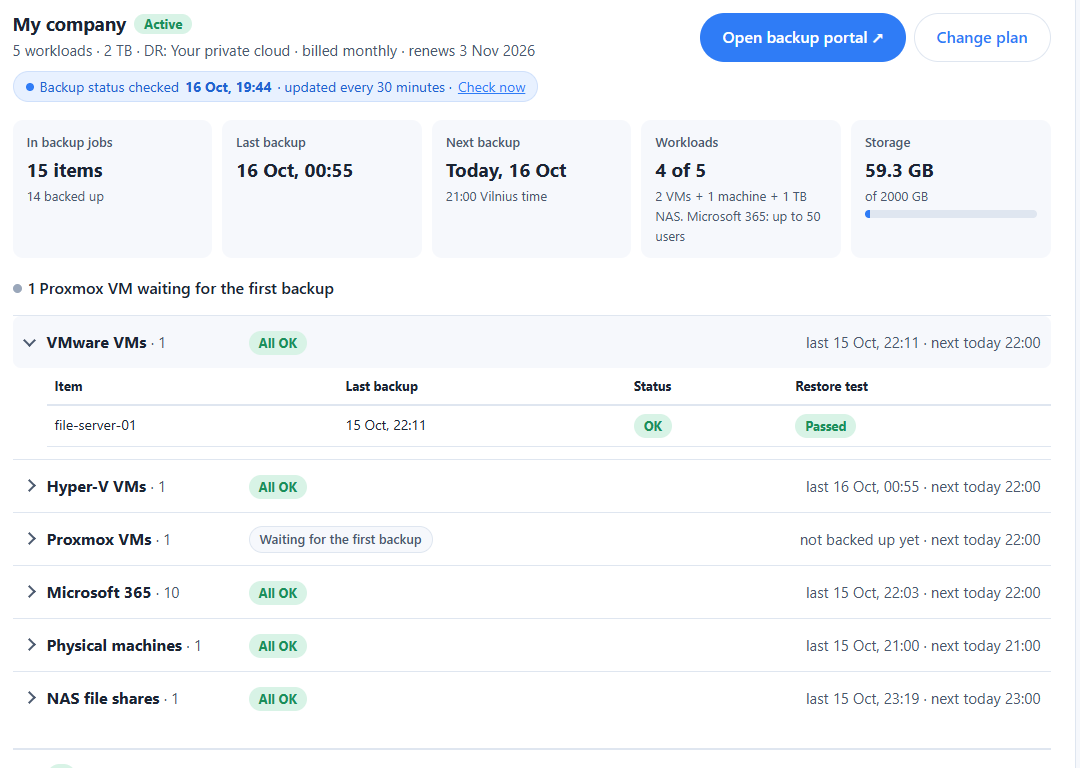
We create the nightly backup job, test-restore your VMware and Hyper-V VMs after every run and email you if anything needs attention. Your account page shows the result per item.
What we set up for you
| Platform | Nightly backup job created for you | Automatic restore test |
|---|---|---|
| VMware vSphere | Yes | Yes, after every run |
| Microsoft Hyper-V | Yes | Yes, after every run |
| Proxmox VE | Yes | Coming soon; test a restore monthly meanwhile |
| Physical Windows and Linux machines | Yes | No; test a restore monthly |
| NAS shares (SMB, NFS) | Yes | No; test a restore monthly |
| Microsoft 365 | Yes | — |
| Nutanix AHV and others | You create it, with our guide | No |
Every automatic job runs nightly, keeps recovery points for 30 days, makes them immutable for 7 and encrypts them. You can change it in the portal at any time.
Every morning, proof that last night's backup worked
Your account page shows the last backup and restore test for every VM, server, share and mailbox, with problems emailed to you. The backup portal behind it is yours too, if you want to look closer or change a job.
Backup & Disaster Recovery based on NAKIVO
NAKIVO is the backup engine. We run it for you: the backup portal, your storage, automatic backup jobs and restore tests, disaster recovery setup, and a person to email when you need help.
Ransomware protection
Anti-ransomware software alone is not enough. A trusted backup is your safety net for recovering data and resuming operations.
Problems come to you
Your account page shows every item's last backup and restore test. If a backup fails or is overdue, we email you; you don't have to watch the jobs.
NAS data
Incremental backups of network shares over NFS and SMB, with recovery of individual files and folders to any location.
Your own storage bucket
Every subscription gets its own dedicated cloud storage bucket with its own access keys.
Choose the level of data protection you need
Pay per protected workload plus the storage you need. No setup fees, cancel any time. Pick an example or set your own numbers:
Your backups stay in the EU, isolated and locked
Stored in the EU
Backups go to Wasabi's EU region in Frankfurt. Our own systems, including the private-cloud DR site, run in Lithuania.
Immutable
Every bucket has Object Lock, so recovery points are locked against changes and deletion for their immutability period. Ransomware can't encrypt or erase them.
Encrypted
Data is encrypted in transit, and every automatic backup job also encrypts the backups themselves. Access keys and credentials are stored encrypted.
Isolated per customer
Every subscription has its own bucket and its own backup portal space. Its access keys only work for that bucket.
GDPR
A data processing agreement is part of our terms, and all sub-processors are listed there. Operated by UAB „IT Edge Pro“, Lithuania.
Secure accounts
Two-factor authentication on your account. You open the backup portal from your account page, so there's no second password to leak.
Common questions
How long does setup take?
Your storage bucket and backup portal are ready a few minutes after you order. Next, you install the Transporter, a small service, on a Windows or Linux machine in your network. Then add what you want to protect in the portal. For VMware, Hyper-V, Proxmox, physical machines, NAS shares and Microsoft 365, that's all: we create the nightly backup job automatically within minutes.
Do I need a VPN or open firewall ports?
No. The Transporter connects out to our service over an encrypted connection, so you don't open any inbound ports.
What can I back up?
VMware vSphere, Hyper-V and Proxmox VE virtual machines, physical Windows and Linux servers, Microsoft 365, and NAS shares over NFS and SMB. Each server or VM counts as one workload, as does each TB of NAS data; each workload also covers 10 Microsoft 365 users.
How do I know my backups actually work?
For VMware and Hyper-V, after every nightly run each VM is started briefly from its new backup on your own host, without a network connection. We take a screenshot, then discard the test VM. Your account page shows the result for each VM. For Proxmox VMs, physical machines and NAS shares, restore a few files or a VM once a month; the guide shows how. You can run your own restore tests in the portal at any time.
How fast can I recover?
Single files and folders come back in minutes. Flash VM Boot starts a whole VM directly from its backup, without copying it first. With a disaster recovery plan, VMware VMs are replicated continuously and can be started at the DR site. Other systems start from their latest backup.
What's the difference between the disaster recovery options?
None: backup only; you restore to any hardware or virtual disk, and you can add disaster recovery later. Your private cloud: recovery to infrastructure you provide, set up by us together with you. Our private cloud: your systems start on our infrastructure in Lithuania, on a network kept separate from other customers. AWS: recovery to your AWS account and region. For every disaster recovery option we agree a written DR plan with you, and one test failover per year is included.
What happens if I cancel?
Everything keeps working until the end of the period you've paid for. After that, we keep your data for 30 days in case you want to reactivate or need help getting it back. Then it is permanently deleted.
Why not buy NAKIVO myself?
You can — the backup engine is the same. With us you don't run the backup server, buy storage or renew licences, and backup jobs and restore tests are set up for you. Compare both.
Are prices with VAT?
Prices are shown without VAT. EU businesses with a valid VAT number are invoiced under reverse charge. Paying annually saves 10%.
How do I get help?
By email or through the contact form. We reply within one business day. Step-by-step guides are in the knowledge base, and you can book an onboarding call.